
Many Japanese limited editions on Amazon Japan (Amazon.co.jp) can be delivered straight to your door through AmazonGlobal, its international shipping. No proxy or forwarding service needed.
In short:
- Switch to English and USD.
- Check that the item ships to you and the seller is Amazon.co.jp.
- You see the full cost, including import charges, before you pay.
Every item on Japan Grail Digest is sold by Amazon.co.jp and can be delivered outside Japan.
Table of Contents
Step 1: Switch to English and USD
- Click ☰ すべて (“All”) at the top left.
- At the bottom of the menu, under ヘルプと設定 (“Help & Settings”), click 🌐 日本語.
- Choose English – EN and $ – USD, then click 変更を保存 (“Save Changes”).
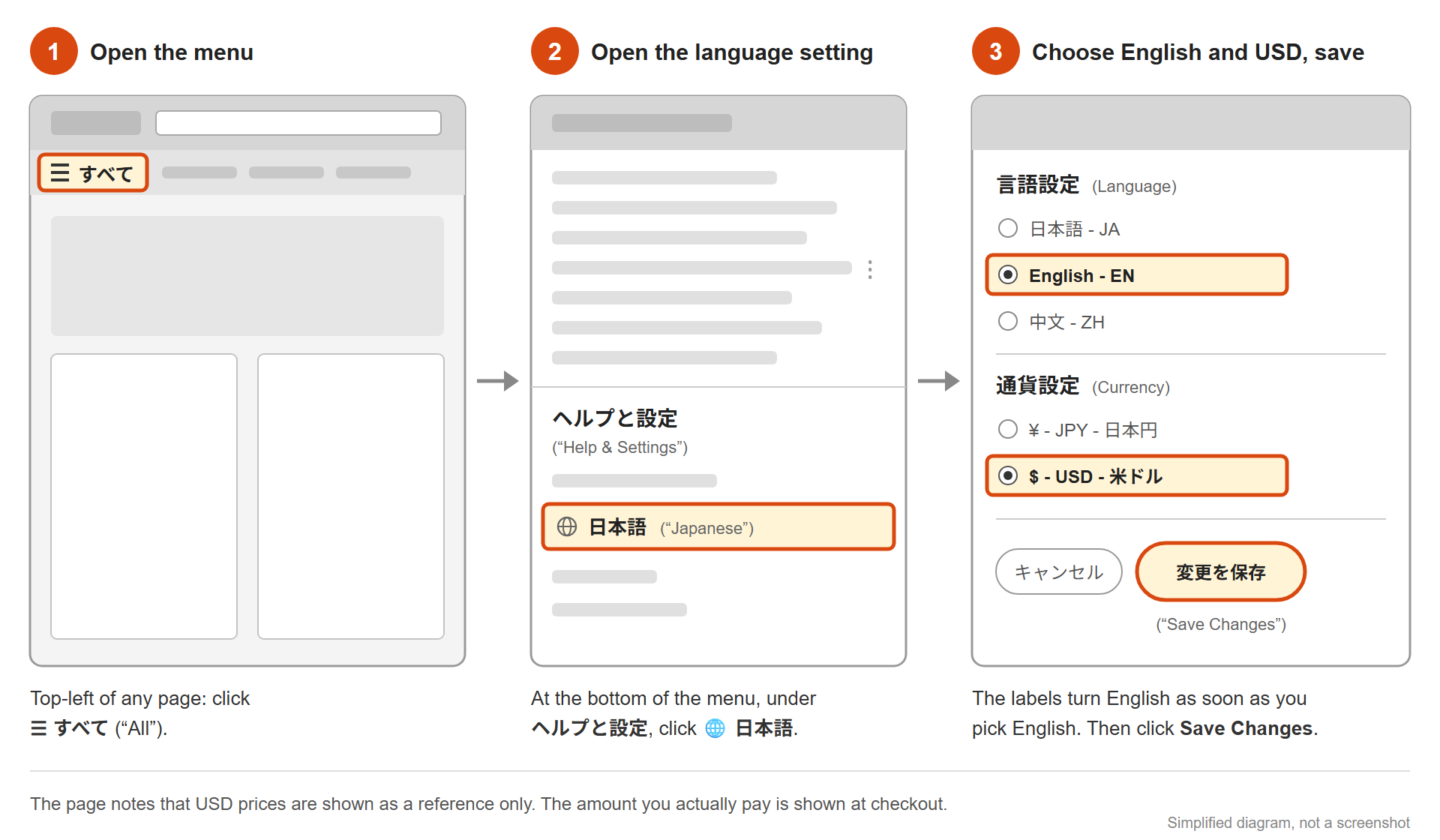
- USD prices are for reference. Your card is charged in yen (Step 6).
- Don’t click the country (“Japan”) in the menu. It opens a different Amazon store.
Step 2: Check your delivery country
On your first visit, you may see this message:
We’re showing you items that ship to United States. To see items that ship to a different country, change your delivery address.
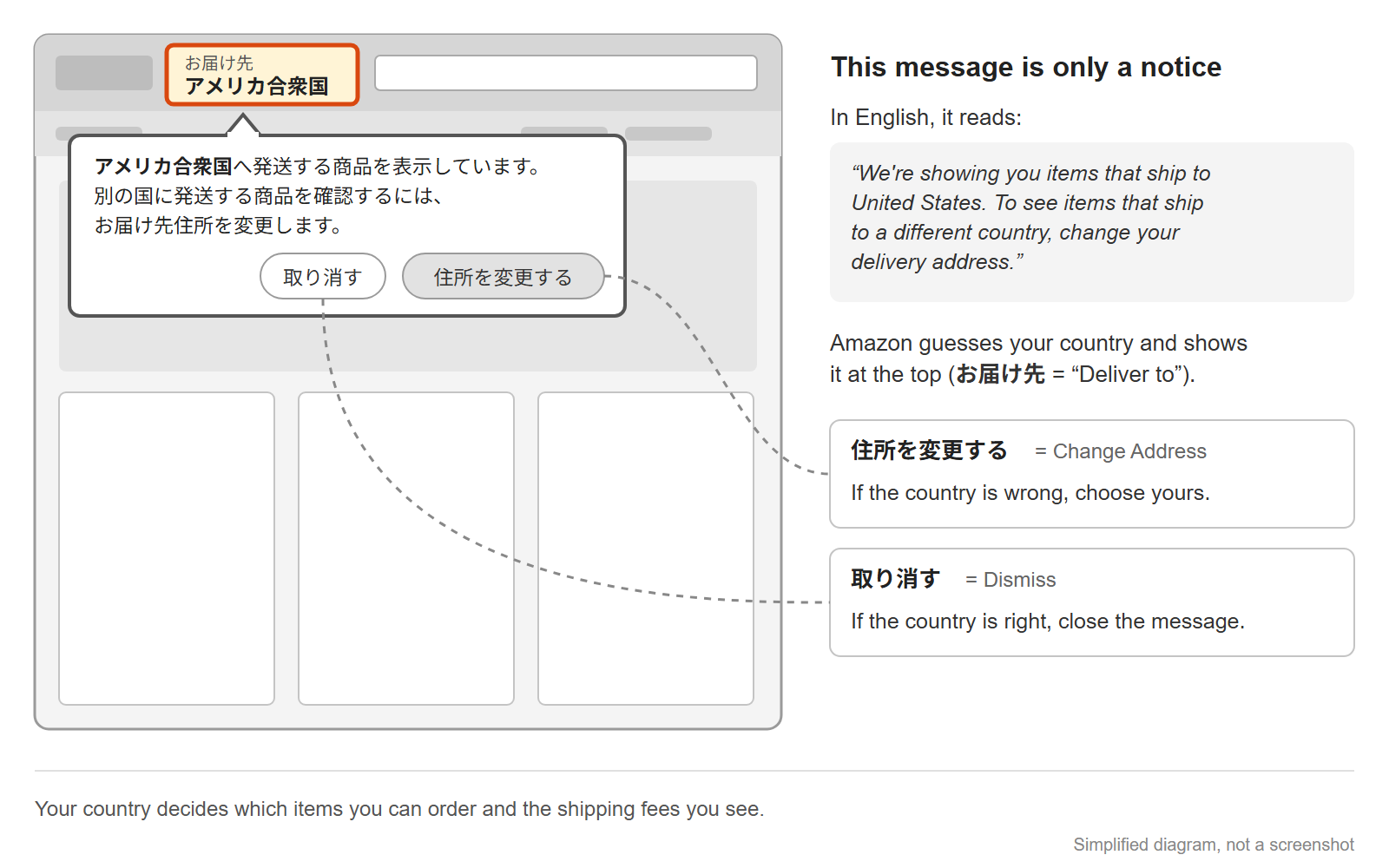
- Right country: click Dismiss (取り消す).
- Wrong country: click Change Address (住所を変更する) and choose yours.
The guess can be wrong (we once got “Deliver to Canada” from a US connection), so check the “Deliver to” country at the top of the page.
Step 3: Check that the item ships to you
Look at the buying box on the item’s page.
- Ships to you: a delivery fee, a delivery date, and a cart button.
- Doesn’t ship to you: “This item cannot be shipped to your selected delivery location.” No cart button.
Step 4: Check that the seller is Amazon.co.jp
In the buying box, the line Shipper / Seller should say Amazon.co.jp.
Other sellers on the same page (the “marketplace”) may sell used items, or may not deliver outside Japan.
Step 5: Create an account
- Add the item to your cart and go to checkout.
- Enter your email address, then click Proceed to create an account.
- Enter your name and a password (6+ characters), then click Continue.
- Verify your mobile phone number.
Step 6: Add your address and payment
- Address: your home address.
- Payment: your card is charged in yen (“Your card will be charged in JPY”). Your card company may add a foreign transaction fee.
Shipping fees and import charges
- Shipping: a fee per shipment plus a fee per item, so ordering items together is usually cheaper per item. To the US, the per-shipment fee starts at ¥2,400 (Standard, about US$15) or ¥2,600 (Priority, about US$16) as of October 2026, with dollars at the November 6, 2026 exchange rate. See Amazon.co.jp’s Global Shipping Rates for your country.
- Import charges: shown only on the final checkout page (with the Place your order button), as Import Charges.
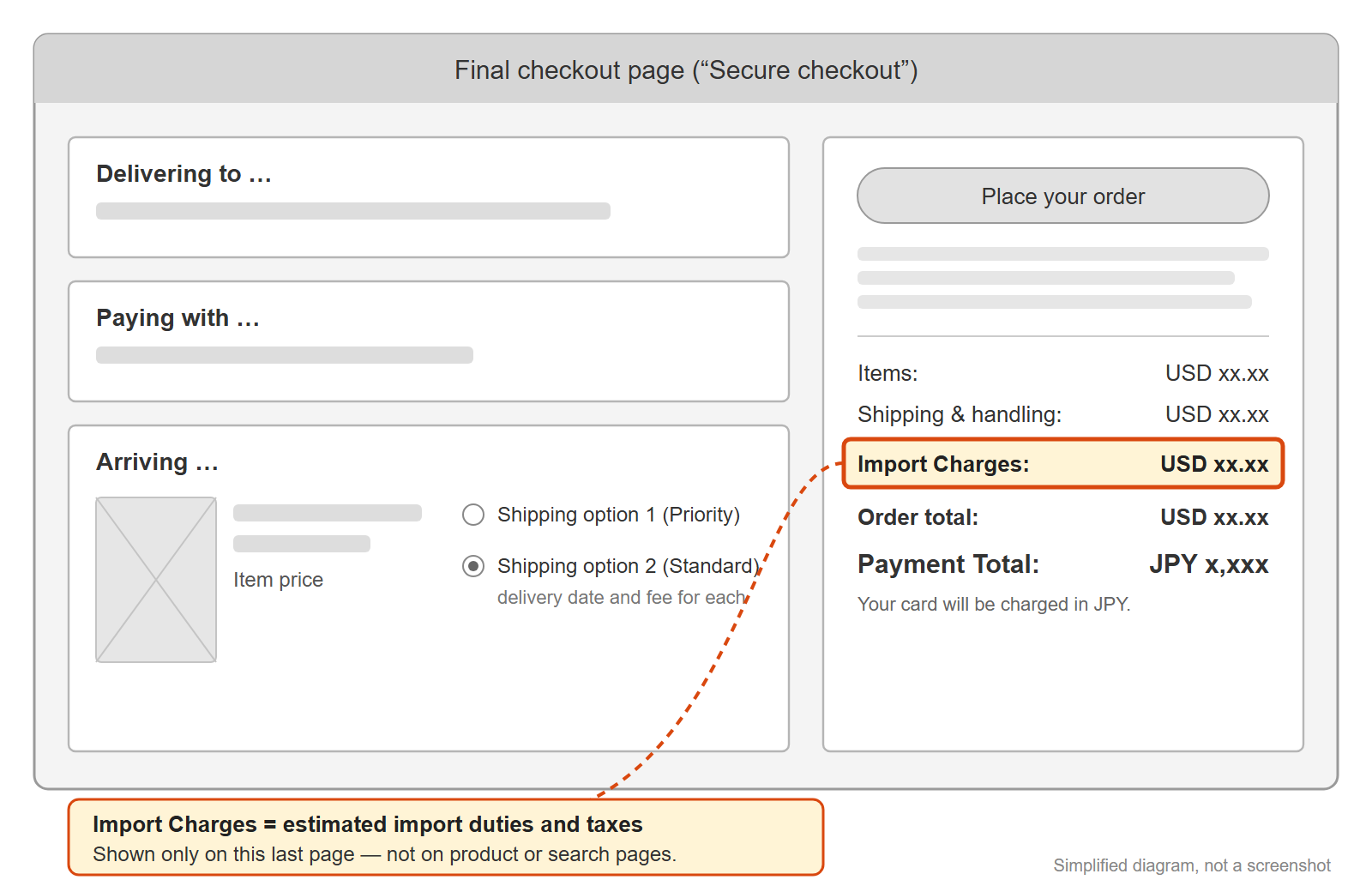
Example (one item to New York, USA, October 2026):
| Line | Amount |
|---|---|
| Items | USD 15.80 |
| Shipping & handling | USD 19.07 |
| Import Charges | USD 4.44 |
| Order total | USD 39.30 |
| Payment Total (charged to the card) | JPY 6,229 |
This is only an example. Amounts depend on your country, the item, and the day.
Pre-orders
Some pre-order items sold by Amazon.co.jp show Pre-order Price Guarantee (予約商品の価格保証) on the product page. For these, you pay the lowest price shown on Amazon.co.jp between your order and the start of shipping (or the release date, if that comes first). Amazon applies it automatically.
- Only items that show this message on their page are covered. Check the page before you order.
- It doesn’t cover items from other sellers on the page.
Finding items yourself
Use the International Shipping Eligible filter on the search page. Kindle (e-book) editions still appear, so for a printed book, pick the paperback or special edition. Then check Steps 3 and 4.
Don’t know the Japanese title? Our Amazon Japan Search Link Builder turns an English series name into a search on Amazon.co.jp in Japanese, filtered to items sold by Amazon.co.jp that can ship outside Japan (you can turn the filters off).
Quick checklist
- ☐ English and USD
- ☐ Your delivery country
- ☐ A delivery fee and a cart button
- ☐ “Shipper / Seller”: Amazon.co.jp
- ☐ Import Charges and the JPY total on the final checkout page
What we haven’t verified
We’re based in Japan and checked these steps in October 2026 with a US connection and a US address. We haven’t verified:
- Shipping fees and import charges for other countries
- Delivery times
- Pre-orders, including whether the Pre-order Price Guarantee applies to orders shipped outside Japan
- Returns and customer service
- Buying Kindle editions from outside Japan
- Whether the site opens in English if your browser is set to English
- How marketplace sellers’ offers look from outside Japan
Tell us
Ordered from Amazon.co.jp? Tell us your country, delivery time, and costs through the Contact page. We’ll add it to this guide as “reported by a reader” (country and date only, never your name or email).